Generative AI For Business Users
Links
- This Site, the links are all for the same site (Please access the shared link site from off the DB network and using a non-DB device as it may be blocked by your firewalls)
- Indra Sharepoint : The DB AI & Innovation Hub
- Indra Shared Services: Indra Shared Services
- For questions, participants should send an email to ai-training@list.db.com
Trainers
- Joey Gagliardo
- LinkedIn: https://linkedin.com/in/joeygagliardo
- Email: joey.gagliardo@roitraining.com
- Paul Leroy
- LinkedIn: https://linkedin.com/in/paulleroyza
- Email: paul.leroy@roitraining.com
- Hugo Juárez
- LinkedIn: https://www.linkedin.com/in/hugo-domenech/
- Email: hugo@yourcloudtrainer.com
- Mehdi Rezvan
- LinkedIn: https://www.linkedin.com/in/mehdi-rezvan/
- Email: mehdi.rezvan@gmail.com
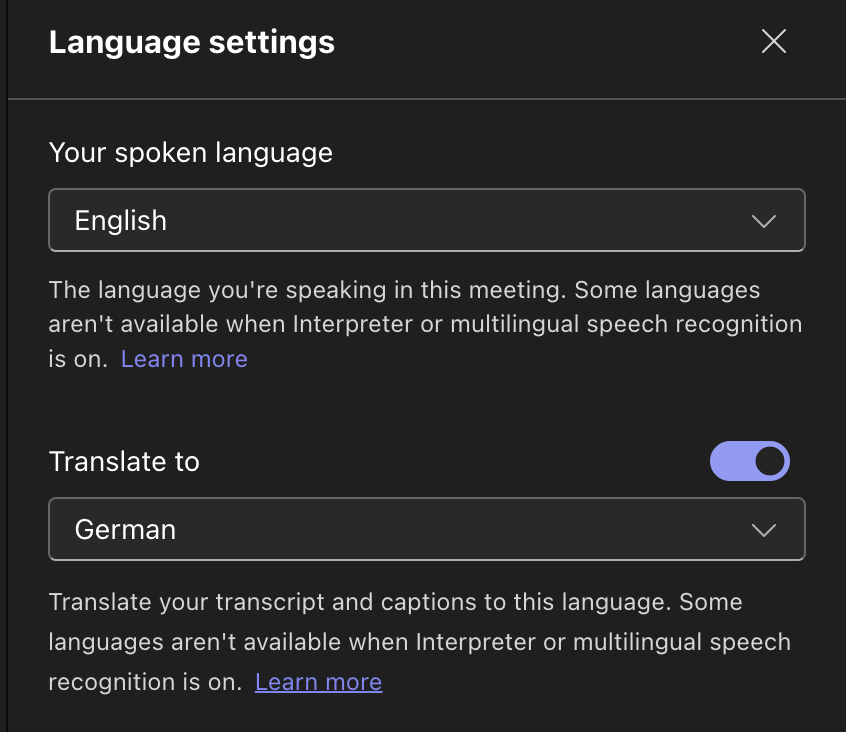
Using translate in teams
In teams:
-
Click the three dots (to the left of the view button)

-
Click Language and Speech
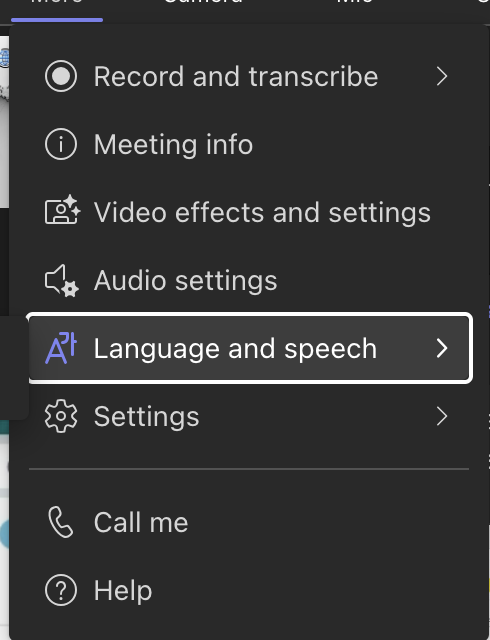
-
Click show live captions
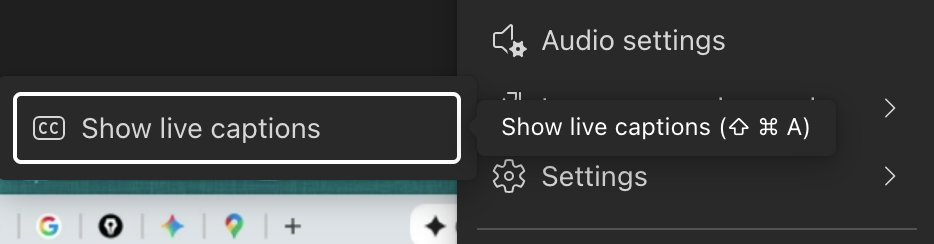
-
In the captions window, you should have either three dots or a gear, click that
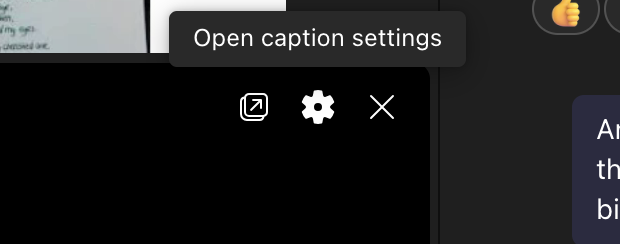
-
Click Language Settings

-
Below your spoken language you should see a translation slider

-
Select the language you'd like the translation to be in
Skills.Google (formerly known as Cloud Skills Boost)
For Skills.Google (formerly Cloud Skills Boost) sign up, please use this link:
Create a Cloudskillsboost Account:
- Open https://skills.google/organizations/deutsche-bank/invites/dbinvite and click on Join button.
- Provide Your First Name, Last Name, DB email address etc. and register. It is mandatory to create your account with db email address.
- You should receive a confirmation email from Cloud Skills Boost. Click on the confirmation link to confirm your email address.
- Login and Accept Terms of Services. Click on Profile Menu.
Find a detailed guide to create a Skills Boost account and a public profile
To sign up: https://skills.google/users/sign_up - How to create a public profile on cloudskillsboost: https://deutschebank.sharepoint.com/sites/AITalentandLearning/SitePages/Create-a-Google-Cloud-Skillsboost-Account.aspx - To sign in: https://skills.google/users/sign_in
If you get a Email address already exists error
If you sign up and get the error that the email is already in use, just use the forgot password link to reset your password so you can login again
Labs
https://skills.google/games/5733
Login with your DB email and Cloud Skills Boost password. Also, use your personal laptop as the site may not work correctly through the DB Firewalls. If you have not previously registered for qwiklabs or cloudskillsboost, you may need to do that.
Warning
Check the Frequently Asked Questions for common lab issues
Frequently Asked Questions about labs and how to solve them
- Audio Issues If you have audio issues we have checked them on our side, please try to disconnect and reconnect
- Error: Account Deleted The student credentials are only valid while the lab is running, the entire lab project is also set up at the start of the lab and torn down (deleted) at the end of the lab when iether the timer expires or you click end lab. You'll need to start your lab again and get new credentials and a new project environment.
- Pro Tip: Close all incognito/inPrivate/Private windows between labs to ensure that the student credentials are flushed. If you accidentally do this during a lab, just log back in, your work is in the cloud.
- Error: You need additional access to the project: qwiklabs-gcp-xx-xxxxxxxxx This is most likely because you opened the console by left clicking on the 'open cloud console' button, this causes your browser to send your credentials and not the student credentials to the gcp console. This causes all the API calls to be as you (who doesn't have access) rather than the student credentials that has access.
- To check: in the top right of the gcp console it will have a circle with either you avatar or a coloured circle with an 's' in it, if you click on it and it shows your Gmail/workspace account then you won't have permissions on the project.
- To fix: close all inPrivate (Microsoft edge), private (Firefox) or incognito (Chrome) windows depending on which browser you use, then right click on the open console button and open link in a new incognito/private/inPrivate window. You will then log into the incognito windows with the student credentials from the lab. Then you can redo the check to confirm that you are logged in using the student credentials.
Evaluation Link
Class feedback survey link is : https://app.dbsurvey.dbsurvey.prd.gcp.db.com/index.php/399755
Class feedback survey link is : https://app.dbsurvey.dbsurvey.prd.gcp.db.com/index.php/399755
Continued Learning Opportunities:
- ROI YouTube Tutorials and Demos
- LinkedIn Student Resource Group
- ROI Training LinkedIn for News and Updates
- Google Certification Paths
- Full Course List